☕️ Coffee Machine Example
This example demonstrates a complete traceability chain for a coffee machine system, from high-level requirements down to implementation and test cases.
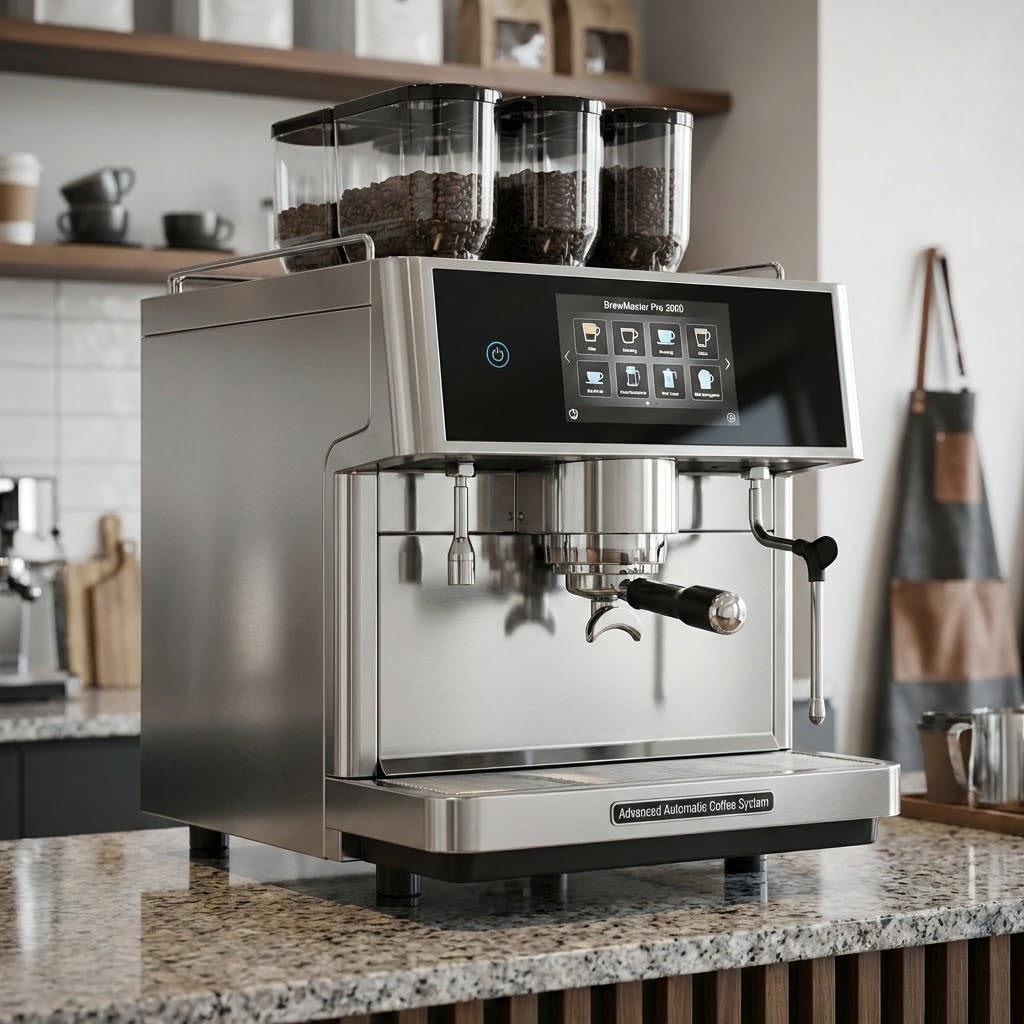
The BrewMaster Pro 3000 is an advanced automatic coffee machine designed for commercial and high-end residential use. Featuring precision temperature control, customizable brew strength settings, and comprehensive safety mechanisms, it represents the cutting edge of coffee brewing technology. This document traces the complete development lifecycle from initial customer needs through verified implementation.
System Requirements
The system requirements capture the fundamental capabilities that the BrewMaster Pro 3000 must deliver to meet customer expectations and safety standards. These high-level requirements define what the system does from an external perspective, focusing on user-visible behavior and safety constraints. Each requirement has been derived from market analysis, customer feedback, and applicable safety regulations for household appliances.
The coffee machine shall be able to brew coffee with user-selected strength (weak, medium, strong). |
The coffee machine shall heat water to the appropriate temperature (85-95°C) for brewing coffee. |
The coffee machine shall provide a user interface with buttons for selecting coffee strength and starting the brewing process. |
The coffee machine shall automatically shut down if the water temperature exceeds 100°C or if no water is detected. |
Software Requirements
The software requirements section refines the high-level system requirements into detailed, implementable specifications for the embedded control system. The BrewMaster Pro 3000 runs on a custom Rust-based embedded platform with real-time capabilities, chosen for its memory safety guarantees, zero-cost abstractions, and excellent embedded systems support. These requirements specify precise timing constraints, control algorithms, and safety-critical behavior that must be implemented in software. Each software requirement is traceable back to one or more system requirements, ensuring complete coverage of customer needs.
The temperature control software shall monitor the water temperature sensor and regulate the heating element to maintain temperature between 85-95°C using PID control. |
The software shall continuously monitor water temperature and trigger an emergency shutdown within 100ms if temperature exceeds 100°C to prevent boiling and potential hazards. |
The software shall implement brew strength selection by controlling the water flow rate and brewing time:
|
The software shall process button inputs with debouncing and trigger appropriate actions (strength selection, start brewing, stop/cancel). |
The software shall continuously monitor the water level sensor and prevent brewing operations when water level is below minimum threshold. |
Software Architecture
The software architecture defines the modular structure of the BrewMaster Pro 3000’s embedded control system. The architecture follows a layered approach with clear separation of concerns: safety-critical functions are isolated in dedicated modules, control algorithms are encapsulated for reusability, and user interface logic is decoupled from core brewing operations. This modular design enables independent testing, facilitates maintenance, and provides clear interfaces between components.
The architecture emphasizes fail-safe design principles. The Safety Monitor Module operates with the highest priority and can override all other subsystems. Module dependencies are carefully managed to prevent circular references and ensure deterministic behavior. The following diagram shows the architectural modules and their relationships:
Module responsible for PID-based temperature control. Interfaces:
|
![@startuml
component "<size:12>Component</size>\n**Temperature**\n**Controller**\n**Module**\n<size:10>COMP_TEMP_CTRL</size>" as COMP_TEMP_CTRL [[../coffee-machine/index.html#COMP_TEMP_CTRL]] #3498db
node "<size:12>SW_Requirement</size>\n**Temperature**\n**Regulation**\n<size:10>SWREQ_TEMP_REGULATION</size>" as SWREQ_TEMP_REGULATION [[../coffee-machine/index.html#SWREQ_TEMP_REGULATION]] #a8f578
interface "<size:12>Interface</size>\n**Safety Command**\n**Interface**\n<size:10>INTF_SAFETY_CMD</size>" as INTF_SAFETY_CMD [[../coffee-machine/index.html#INTF_SAFETY_CMD]] #16a085
interface "<size:12>Interface</size>\n**Sensor Data**\n**Interface**\n<size:10>INTF_SENSOR_DATA</size>" as INTF_SENSOR_DATA [[../coffee-machine/index.html#INTF_SENSOR_DATA]] #16a085
interface "<size:12>Interface</size>\n**Temperature**\n**Status**\n**Interface**\n<size:10>INTF_TEMP_STATUS</size>" as INTF_TEMP_STATUS [[../coffee-machine/index.html#INTF_TEMP_STATUS]] #16a085
interface "<size:12>Interface</size>\n**Temperature**\n**Controller**\n**Safety Status**\n**Interface**\n<size:10>INTF_TEMP_CTRL_STATUS</size>" as INTF_TEMP_CTRL_STATUS [[../coffee-machine/index.html#INTF_TEMP_CTRL_STATUS]] #16a085
SWREQ_TEMP_REGULATION <-- COMP_TEMP_CTRL
COMP_TEMP_CTRL --( INTF_SAFETY_CMD
COMP_TEMP_CTRL --( INTF_SENSOR_DATA
COMP_TEMP_CTRL -- INTF_TEMP_STATUS
COMP_TEMP_CTRL -- INTF_TEMP_CTRL_STATUS
@enduml](../_images/plantuml-b10ab42656ba3768636b8995cd61d7fafdbfc1b1.svg)
Module managing the brewing process state machine. States: IDLE, HEATING, BREWING, COMPLETE, ERROR. Controls pump and valve timing based on selected strength. Waits for temperature ready signal before initiating brew cycle. Monitors safety status continuously.
|
![@startuml
component "<size:12>Component</size>\n**Brew Controller**\n**Module**\n<size:10>COMP_BREW_CTRL</size>" as COMP_BREW_CTRL [[../coffee-machine/index.html#COMP_BREW_CTRL]] #3498db
node "<size:12>SW_Requirement</size>\n**Brew Strength**\n**Selection**\n<size:10>SWREQ_BREW_STRENGTH</size>" as SWREQ_BREW_STRENGTH [[../coffee-machine/index.html#SWREQ_BREW_STRENGTH]] #a8f578
interface "<size:12>Interface</size>\n**Temperature**\n**Status**\n**Interface**\n<size:10>INTF_TEMP_STATUS</size>" as INTF_TEMP_STATUS [[../coffee-machine/index.html#INTF_TEMP_STATUS]] #16a085
interface "<size:12>Interface</size>\n**Safety Command**\n**Interface**\n<size:10>INTF_SAFETY_CMD</size>" as INTF_SAFETY_CMD [[../coffee-machine/index.html#INTF_SAFETY_CMD]] #16a085
interface "<size:12>Interface</size>\n**User Command**\n**Interface**\n<size:10>INTF_USER_CMD</size>" as INTF_USER_CMD [[../coffee-machine/index.html#INTF_USER_CMD]] #16a085
interface "<size:12>Interface</size>\n**Brew Controller**\n**Safety Status**\n**Interface**\n<size:10>INTF_BREW_CTRL_STATUS</size>" as INTF_BREW_CTRL_STATUS [[../coffee-machine/index.html#INTF_BREW_CTRL_STATUS]] #16a085
SWREQ_BREW_STRENGTH <-- COMP_BREW_CTRL
COMP_BREW_CTRL --( INTF_TEMP_STATUS
COMP_BREW_CTRL --( INTF_SAFETY_CMD
COMP_BREW_CTRL --( INTF_USER_CMD
COMP_BREW_CTRL -- INTF_BREW_CTRL_STATUS
@enduml](../_images/plantuml-14a6902cf0d64924b68041149eb12af46c38712d.svg)
Module handling all user interactions including button debouncing, LED status indicators, and display updates. Interfaces with the Brew Controller to send user commands (strength selection, start/stop).
|
![@startuml
component "<size:12>Component</size>\n**User Interface**\n**Module**\n<size:10>COMP_UI_MODULE</size>" as COMP_UI_MODULE [[../coffee-machine/index.html#COMP_UI_MODULE]] #3498db
node "<size:12>SW_Requirement</size>\n**Button Input**\n**Handler**\n<size:10>SWREQ_BUTTON_INPUT</size>" as SWREQ_BUTTON_INPUT [[../coffee-machine/index.html#SWREQ_BUTTON_INPUT]] #a8f578
interface "<size:12>Interface</size>\n**User Command**\n**Interface**\n<size:10>INTF_USER_CMD</size>" as INTF_USER_CMD [[../coffee-machine/index.html#INTF_USER_CMD]] #16a085
SWREQ_BUTTON_INPUT <-- COMP_UI_MODULE
COMP_UI_MODULE -- INTF_USER_CMD
@enduml](../_images/plantuml-14ea9493d12c1b53d30882d6dcc6fc01bf4e3721.svg)
Module performing continuous safety checks on temperature and water level. Implements fail-safe shutdown procedures.
|
![@startuml
component "<size:12>Component</size>\n**Safety Monitor**\n**Module**\n<size:10>COMP_SAFETY_MON</size>" as COMP_SAFETY_MON [[../coffee-machine/index.html#COMP_SAFETY_MON]] #3498db
node "<size:12>SW_Requirement</size>\n**Water Level**\n**Monitoring**\n<size:10>SWREQ_WATER_LEVEL</size>" as SWREQ_WATER_LEVEL [[../coffee-machine/index.html#SWREQ_WATER_LEVEL]] #a8f578
node "<size:12>SW_Requirement</size>\n**Over-**\n**Temperature**\n**Shutdown**\n<size:10>SWREQ_OVERTEMP_SHUTDOWN</size>" as SWREQ_OVERTEMP_SHUTDOWN [[../coffee-machine/index.html#SWREQ_OVERTEMP_SHUTDOWN]] #a8f578
interface "<size:12>Interface</size>\n**Temperature**\n**Controller**\n**Safety Status**\n**Interface**\n<size:10>INTF_TEMP_CTRL_STATUS</size>" as INTF_TEMP_CTRL_STATUS [[../coffee-machine/index.html#INTF_TEMP_CTRL_STATUS]] #16a085
interface "<size:12>Interface</size>\n**Brew Controller**\n**Safety Status**\n**Interface**\n<size:10>INTF_BREW_CTRL_STATUS</size>" as INTF_BREW_CTRL_STATUS [[../coffee-machine/index.html#INTF_BREW_CTRL_STATUS]] #16a085
interface "<size:12>Interface</size>\n**Sensor Data**\n**Interface**\n<size:10>INTF_SENSOR_DATA</size>" as INTF_SENSOR_DATA [[../coffee-machine/index.html#INTF_SENSOR_DATA]] #16a085
interface "<size:12>Interface</size>\n**Safety Command**\n**Interface**\n<size:10>INTF_SAFETY_CMD</size>" as INTF_SAFETY_CMD [[../coffee-machine/index.html#INTF_SAFETY_CMD]] #16a085
SWREQ_WATER_LEVEL <-- COMP_SAFETY_MON
SWREQ_OVERTEMP_SHUTDOWN <-- COMP_SAFETY_MON
COMP_SAFETY_MON --( INTF_TEMP_CTRL_STATUS
COMP_SAFETY_MON --( INTF_BREW_CTRL_STATUS
COMP_SAFETY_MON --( INTF_SENSOR_DATA
COMP_SAFETY_MON -- INTF_SAFETY_CMD
@enduml](../_images/plantuml-9ce31737ff2c5983cf74d9ef8bae7188eabb6c29.svg)
Module providing abstraction over hardware sensors and actuators. Handles low-level sensor reading via ADC, signal conditioning, and calibration. Interfaces:
Implements DMA-based ADC sampling at 100Hz with automatic averaging and outlier rejection for robust sensor readings.
|
![@startuml
component "<size:12>Component</size>\n**Hardware**\n**Abstraction**\n**Layer**\n<size:10>COMP_HAL</size>" as COMP_HAL [[../coffee-machine/index.html#COMP_HAL]] #3498db
interface "<size:12>Interface</size>\n**Sensor Data**\n**Interface**\n<size:10>INTF_SENSOR_DATA</size>" as INTF_SENSOR_DATA [[../coffee-machine/index.html#INTF_SENSOR_DATA]] #16a085
COMP_HAL -- INTF_SENSOR_DATA
@enduml](../_images/plantuml-5189073ead1c3933af72a7a971d7186b6df19f99.svg)
Component Interfaces
The following interfaces define the communication contracts between architectural components. Each interface specifies the data exchanged, protocols used, and timing constraints to ensure deterministic and safe inter-component communication.
Provider: Temperature Controller Module Consumer: Brew Controller Module Description: Provides current temperature readings and heating status to the brew controller. Data Elements:
Protocol: Shared memory with atomic updates, 100ms refresh rate |
Provider: Safety Monitor Module Consumers: Temperature Controller, Brew Controller Description: Emergency shutdown commands from safety monitor to all controlled subsystems. Commands:
Protocol: Interrupt-driven with hardware watchdog backup, highest priority |
Provider: Temperature Controller Module Consumer: Safety Monitor Module Description: Heartbeat and fault status reported by the Temperature Controller to the Safety Monitor for fault detection. Data Elements:
Protocol: Polled by safety monitor at 10Hz |
Provider: Brew Controller Module Consumer: Safety Monitor Module Description: Heartbeat and fault status reported by the Brew Controller to the Safety Monitor for fault detection. Data Elements:
Protocol: Polled by safety monitor at 10Hz |
Provider: User Interface Module Consumer: Brew Controller Module Description: User commands and settings passed from UI to the brewing state machine. Commands:
Protocol: Message queue with event-driven processing, debounced at UI layer |
Provider: Hardware sensors (temperature, water level) Consumers: Temperature Controller, Safety Monitor Description: Raw sensor readings from hardware via ADC. Data Elements:
Protocol: ADC DMA with double buffering, 100Hz sampling rate |
Static View
![@startuml
' Config
top to bottom direction
' Nodes definition
component "<size:12>Component</size>\n**Temperature**\n**Controller**\n**Module**\n<size:10>COMP_TEMP_CTRL</size>" as COMP_TEMP_CTRL [[../coffee-machine/index.html#COMP_TEMP_CTRL]] #3498db
component "<size:12>Component</size>\n**Brew Controller**\n**Module**\n<size:10>COMP_BREW_CTRL</size>" as COMP_BREW_CTRL [[../coffee-machine/index.html#COMP_BREW_CTRL]] #3498db
component "<size:12>Component</size>\n**User Interface**\n**Module**\n<size:10>COMP_UI_MODULE</size>" as COMP_UI_MODULE [[../coffee-machine/index.html#COMP_UI_MODULE]] #3498db
component "<size:12>Component</size>\n**Safety Monitor**\n**Module**\n<size:10>COMP_SAFETY_MON</size>" as COMP_SAFETY_MON [[../coffee-machine/index.html#COMP_SAFETY_MON]] #3498db
component "<size:12>Component</size>\n**Hardware**\n**Abstraction**\n**Layer**\n<size:10>COMP_HAL</size>" as COMP_HAL [[../coffee-machine/index.html#COMP_HAL]] #3498db
interface "<size:12>Interface</size>\n**Temperature**\n**Status**\n**Interface**\n<size:10>INTF_TEMP_STATUS</size>" as INTF_TEMP_STATUS [[../coffee-machine/index.html#INTF_TEMP_STATUS]] #16a085
interface "<size:12>Interface</size>\n**Safety Command**\n**Interface**\n<size:10>INTF_SAFETY_CMD</size>" as INTF_SAFETY_CMD [[../coffee-machine/index.html#INTF_SAFETY_CMD]] #16a085
interface "<size:12>Interface</size>\n**Temperature**\n**Controller**\n**Safety Status**\n**Interface**\n<size:10>INTF_TEMP_CTRL_STATUS</size>" as INTF_TEMP_CTRL_STATUS [[../coffee-machine/index.html#INTF_TEMP_CTRL_STATUS]] #16a085
interface "<size:12>Interface</size>\n**Brew Controller**\n**Safety Status**\n**Interface**\n<size:10>INTF_BREW_CTRL_STATUS</size>" as INTF_BREW_CTRL_STATUS [[../coffee-machine/index.html#INTF_BREW_CTRL_STATUS]] #16a085
interface "<size:12>Interface</size>\n**User Command**\n**Interface**\n<size:10>INTF_USER_CMD</size>" as INTF_USER_CMD [[../coffee-machine/index.html#INTF_USER_CMD]] #16a085
interface "<size:12>Interface</size>\n**Sensor Data**\n**Interface**\n<size:10>INTF_SENSOR_DATA</size>" as INTF_SENSOR_DATA [[../coffee-machine/index.html#INTF_SENSOR_DATA]] #16a085
' Connection definition
COMP_TEMP_CTRL -[dashed]-( INTF_SAFETY_CMD: uses\n
COMP_TEMP_CTRL -[dashed]-( INTF_SENSOR_DATA: uses\n
COMP_BREW_CTRL -[dashed]-( INTF_TEMP_STATUS: uses\n
COMP_BREW_CTRL -[dashed]-( INTF_SAFETY_CMD: uses\n
COMP_BREW_CTRL -[dashed]-( INTF_USER_CMD: uses\n
COMP_SAFETY_MON -[dashed]-( INTF_TEMP_CTRL_STATUS: uses\n
COMP_SAFETY_MON -[dashed]-( INTF_BREW_CTRL_STATUS: uses\n
COMP_SAFETY_MON -[dashed]-( INTF_SENSOR_DATA: uses\n
INTF_TEMP_STATUS -[bold]- COMP_TEMP_CTRL: provided by\n
INTF_SAFETY_CMD -[bold]- COMP_SAFETY_MON: provided by\n
INTF_TEMP_CTRL_STATUS -[bold]- COMP_TEMP_CTRL: provided by\n
INTF_BREW_CTRL_STATUS -[bold]- COMP_BREW_CTRL: provided by\n
INTF_USER_CMD -[bold]- COMP_UI_MODULE: provided by\n
INTF_SENSOR_DATA -[bold]- COMP_HAL: provided by\n
@enduml](../_images/plantuml-879de7ba68a2be641b75862d6dc304951baff31e.svg)
Dynamic View
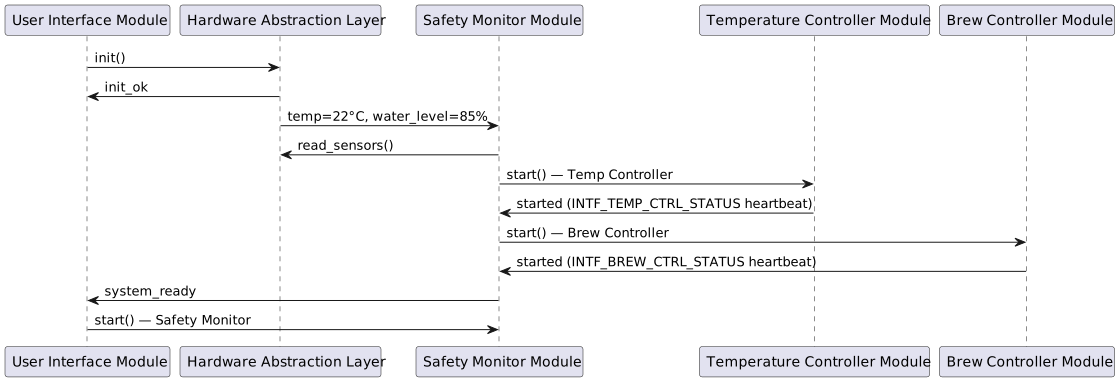
The sequence diagrams below show how the architectural components interact at runtime. Participants map directly to the components defined in the Static View.
The diagrams are generated by needsequence, which traverses the startup_calls
/ shutdown_calls links defined on each component need. Each seq_msg (SEQSTART_01)
need in the chain represents one message; odd hops are participants,
even hops are messages.
Startup Sequence
On power-on the system initialises hardware, validates initial sensor readings, then brings all control modules online in dependency order before signalling readiness to the user.
The sequence message needs (SEQSTART_01–SEQSTART_10) are
defined below. COMP_UI_MODULE is the starting participant.
Startup Sequence Messages
HAL hardware initialisation call from UI Module. |
HAL confirms successful ADC calibration to UI Module. |
UI Module requests Safety Monitor to start and run pre-checks. |
Safety Monitor polls HAL for initial sensor readings. |
HAL returns |
Safety Monitor starts Temperature Controller Module. |
Temperature Controller confirms startup via heartbeat on |
Safety Monitor starts Brew Controller Module. |
Brew Controller confirms startup via heartbeat on |
Safety Monitor signals system readiness to UI Module; UI illuminates the Ready LED. |
Safety Shutdown Sequence
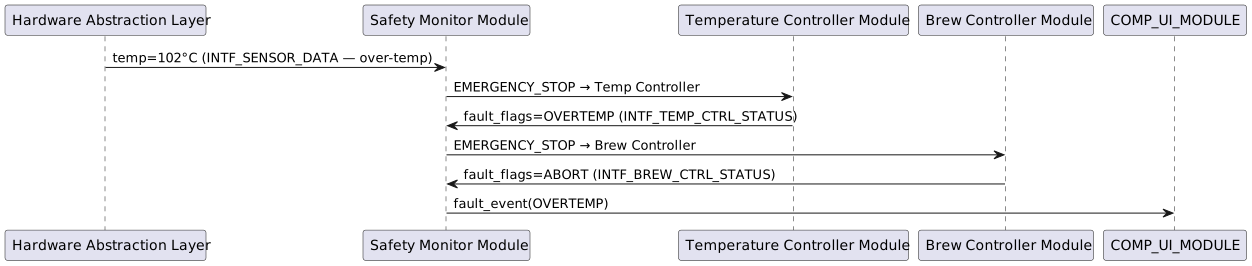
If the Safety Monitor detects an over-temperature condition it issues
an EMERGENCY_STOP command on INTF_SAFETY_CMD to all controlled
subsystems. All modules must respond within 100 ms.
The sequence message needs (SEQSHTDWN_01–SEQSHTDWN_06) are
defined below. COMP_HAL is the starting participant (it is the
source of the over-temperature sensor reading).
Safety Shutdown Sequence Messages
HAL reports temperature exceeding 100 °C threshold to Safety Monitor
via |
Safety Monitor broadcasts |
Temperature Controller confirms shutdown and reports |
Safety Monitor broadcasts |
Brew Controller confirms abort and reports |
Safety Monitor notifies UI Module of over-temperature fault; UI illuminates the Error LED and displays the fault message. |
Implementation
The implementation phase translates the architectural designs into working code. All BrewMaster Pro 3000 software is implemented in Rust, leveraging its memory safety guarantees, zero-cost abstractions, and excellent embedded systems support.
The choice of Rust provides critical advantages for safety-critical applications: compile-time memory safety prevents entire classes of bugs, the type system enforces correct API usage, and the no_std capability enables bare-metal operation if needed. The implementation follows strict coding standards including comprehensive documentation, clippy linting at the pedantic level, and zero unsafe code in safety-critical modules.
Each implementation artifact maps directly to an architectural module,
ensuring traceability from design to code. The code is organized as a
Cargo workspace located in ../../brewmaster-controller/ relative
to this documentation, with clear module boundaries matching the
architectural decomposition.
Rust Interface Implementations
The following interface implementations are extracted from the Rust
source code in crates/coffee-machine/src/interfaces.rs. Each
implementation is automatically traced to its corresponding interface
and component specifications through codelinks annotations.
Rust Artifacts
Test Cases
Comprehensive testing ensures that the BrewMaster Pro 3000 meets all specified requirements and operates safely under all conditions. The test strategy employs multiple levels:
Unit Tests: Verify individual components in isolation (temperature control, button debouncing, state machine transitions)
Integration Tests: Validate interactions between modules (brew controller coordinating with temperature controller)
System Tests: End-to-end verification of complete brewing cycles
Safety Tests: Dedicated verification of all safety-critical functions under normal and fault conditions
All tests are automated and integrated into the continuous integration pipeline. Safety-critical tests are executed on hardware-in-the-loop test benches that simulate real sensors, actuators, and fault conditions. Test coverage targets are set based on the criticality of each component.
Objective: Verify temperature controller maintains target temperature within ±2°C. Steps:
Expected: PWM duty cycle decreases as temperature approaches target, maintains oscillation within ±2°C of setpoint. |
Objective: Verify all three strength settings produce correct timing and water volume. Test Cases:
|
Objective: Verify button handler correctly debounces rapid inputs. Steps:
Expected: Only 1-2 events triggered (first press + possible bounce after 50ms timeout). |
Objective: Verify safety monitor triggers shutdown on critical conditions. Test Cases:
|
Objective: Verify complete brewing cycle from user input to coffee output. Steps:
Expected: System heats to 85-95°C, dispenses 180ml over 4 minutes, returns to idle state, no safety triggers. |
Traceability Overview
Complete traceability is a cornerstone of the BrewMaster Pro 3000 development process. Every line of code can be traced back through architectural designs and requirements to the original customer need or safety regulation. Conversely, every requirement can be traced forward to its implementation and verification test cases. This bidirectional traceability ensures nothing is missed and enables rapid impact analysis when requirements change.
The sphinx-needs tool automates traceability management, maintaining links between artifacts and generating visual diagrams. This example demonstrates:
Requirements → SW Requirements: High-level needs decomposed into software-specific requirements
SW Requirements → Architecture: Requirements mapped to software modules
Architecture → Implementation: Architectural designs realized in code
Implementation → Tests: All implementations verified through test cases
Use the query tools to explore the relationships between these needs and verify complete traceability coverage.
Traceability Diagram
The following diagram shows all needs and their connections in this coffee machine example:
![@startuml
' Config
top to bottom direction
' Nodes definition
node "<size:12>Requirement</size>\n**Brew Coffee**\n<size:10>REQ_BREW_COFFEE</size>" as REQ_BREW_COFFEE [[../coffee-machine/index.html#REQ_BREW_COFFEE]] #FFB300
node "<size:12>Requirement</size>\n**Heat Water**\n<size:10>REQ_HEAT_WATER</size>" as REQ_HEAT_WATER [[../coffee-machine/index.html#REQ_HEAT_WATER]] #FFB300
node "<size:12>Requirement</size>\n**User Interface**\n<size:10>REQ_USER_INTERFACE</size>" as REQ_USER_INTERFACE [[../coffee-machine/index.html#REQ_USER_INTERFACE]] #FFB300
node "<size:12>Requirement</size>\n**Safety Shutdown**\n<size:10>REQ_SAFETY_SHUTDOWN</size>" as REQ_SAFETY_SHUTDOWN [[../coffee-machine/index.html#REQ_SAFETY_SHUTDOWN]] #FFB300
node "<size:12>SW_Requirement</size>\n**Temperature**\n**Regulation**\n<size:10>SWREQ_TEMP_REGULATION</size>" as SWREQ_TEMP_REGULATION [[../coffee-machine/index.html#SWREQ_TEMP_REGULATION]] #a8f578
node "<size:12>SW_Requirement</size>\n**Over-**\n**Temperature**\n**Shutdown**\n<size:10>SWREQ_OVERTEMP_SHUTDOWN</size>" as SWREQ_OVERTEMP_SHUTDOWN [[../coffee-machine/index.html#SWREQ_OVERTEMP_SHUTDOWN]] #a8f578
node "<size:12>SW_Requirement</size>\n**Brew Strength**\n**Selection**\n<size:10>SWREQ_BREW_STRENGTH</size>" as SWREQ_BREW_STRENGTH [[../coffee-machine/index.html#SWREQ_BREW_STRENGTH]] #a8f578
node "<size:12>SW_Requirement</size>\n**Button Input**\n**Handler**\n<size:10>SWREQ_BUTTON_INPUT</size>" as SWREQ_BUTTON_INPUT [[../coffee-machine/index.html#SWREQ_BUTTON_INPUT]] #a8f578
node "<size:12>SW_Requirement</size>\n**Water Level**\n**Monitoring**\n<size:10>SWREQ_WATER_LEVEL</size>" as SWREQ_WATER_LEVEL [[../coffee-machine/index.html#SWREQ_WATER_LEVEL]] #a8f578
component "<size:12>Component</size>\n**Temperature**\n**Controller**\n**Module**\n<size:10>COMP_TEMP_CTRL</size>" as COMP_TEMP_CTRL [[../coffee-machine/index.html#COMP_TEMP_CTRL]] #3498db
component "<size:12>Component</size>\n**Brew Controller**\n**Module**\n<size:10>COMP_BREW_CTRL</size>" as COMP_BREW_CTRL [[../coffee-machine/index.html#COMP_BREW_CTRL]] #3498db
component "<size:12>Component</size>\n**User Interface**\n**Module**\n<size:10>COMP_UI_MODULE</size>" as COMP_UI_MODULE [[../coffee-machine/index.html#COMP_UI_MODULE]] #3498db
component "<size:12>Component</size>\n**Safety Monitor**\n**Module**\n<size:10>COMP_SAFETY_MON</size>" as COMP_SAFETY_MON [[../coffee-machine/index.html#COMP_SAFETY_MON]] #3498db
component "<size:12>Component</size>\n**Hardware**\n**Abstraction**\n**Layer**\n<size:10>COMP_HAL</size>" as COMP_HAL [[../coffee-machine/index.html#COMP_HAL]] #3498db
interface "<size:12>Interface</size>\n**Temperature**\n**Status**\n**Interface**\n<size:10>INTF_TEMP_STATUS</size>" as INTF_TEMP_STATUS [[../coffee-machine/index.html#INTF_TEMP_STATUS]] #16a085
interface "<size:12>Interface</size>\n**Safety Command**\n**Interface**\n<size:10>INTF_SAFETY_CMD</size>" as INTF_SAFETY_CMD [[../coffee-machine/index.html#INTF_SAFETY_CMD]] #16a085
interface "<size:12>Interface</size>\n**Temperature**\n**Controller**\n**Safety Status**\n**Interface**\n<size:10>INTF_TEMP_CTRL_STATUS</size>" as INTF_TEMP_CTRL_STATUS [[../coffee-machine/index.html#INTF_TEMP_CTRL_STATUS]] #16a085
interface "<size:12>Interface</size>\n**Brew Controller**\n**Safety Status**\n**Interface**\n<size:10>INTF_BREW_CTRL_STATUS</size>" as INTF_BREW_CTRL_STATUS [[../coffee-machine/index.html#INTF_BREW_CTRL_STATUS]] #16a085
interface "<size:12>Interface</size>\n**User Command**\n**Interface**\n<size:10>INTF_USER_CMD</size>" as INTF_USER_CMD [[../coffee-machine/index.html#INTF_USER_CMD]] #16a085
interface "<size:12>Interface</size>\n**Sensor Data**\n**Interface**\n<size:10>INTF_SENSOR_DATA</size>" as INTF_SENSOR_DATA [[../coffee-machine/index.html#INTF_SENSOR_DATA]] #16a085
node "<size:12>Implementation</size>\n**BrewStrength**\n**enum**\n<size:10>IMPL_BREW_STRENGTH</size>" as IMPL_BREW_STRENGTH [[../coffee-machine/index.html#IMPL_BREW_STRENGTH]] #fa8638
node "<size:12>Implementation</size>\n**SafetyCommand**\n**enum**\n<size:10>IMPL_SAFETY_CMD_ENUM</size>" as IMPL_SAFETY_CMD_ENUM [[../coffee-machine/index.html#IMPL_SAFETY_CMD_ENUM]] #fa8638
node "<size:12>Implementation</size>\n**UserCommand**\n**enum**\n<size:10>IMPL_USER_CMD_ENUM</size>" as IMPL_USER_CMD_ENUM [[../coffee-machine/index.html#IMPL_USER_CMD_ENUM]] #fa8638
node "<size:12>Implementation</size>\n**TemperatureStat**\n**us struct**\n<size:10>IMPL_TEMP_STATUS</size>" as IMPL_TEMP_STATUS [[../coffee-machine/index.html#IMPL_TEMP_STATUS]] #fa8638
node "<size:12>Implementation</size>\n**TemperatureStat**\n**usProvider**\n**trait**\n<size:10>IMPL_TEMP_STATUS_PROVIDER</size>" as IMPL_TEMP_STATUS_PROVIDER [[../coffee-machine/index.html#IMPL_TEMP_STATUS_PROVIDER]] #fa8638
node "<size:12>Implementation</size>\n**TemperatureStat**\n**usConsumer**\n**trait**\n<size:10>IMPL_TEMP_STATUS_CONSUMER</size>" as IMPL_TEMP_STATUS_CONSUMER [[../coffee-machine/index.html#IMPL_TEMP_STATUS_CONSUMER]] #fa8638
node "<size:12>Implementation</size>\n**TempCtrlStatus**\n**struct**\n<size:10>IMPL_TEMP_CTRL_STATUS</size>" as IMPL_TEMP_CTRL_STATUS [[../coffee-machine/index.html#IMPL_TEMP_CTRL_STATUS]] #fa8638
node "<size:12>Implementation</size>\n**TempCtrlStatusP**\n**rovider trait**\n<size:10>IMPL_TEMP_CTRL_STATUS_PROVIDER</size>" as IMPL_TEMP_CTRL_STATUS_PROVIDER [[../coffee-machine/index.html#IMPL_TEMP_CTRL_STATUS_PROVIDER]] #fa8638
node "<size:12>Implementation</size>\n**TempCtrlStatusC**\n**onsumer trait**\n<size:10>IMPL_TEMP_CTRL_STATUS_CONSUMER</size>" as IMPL_TEMP_CTRL_STATUS_CONSUMER [[../coffee-machine/index.html#IMPL_TEMP_CTRL_STATUS_CONSUMER]] #fa8638
node "<size:12>Implementation</size>\n**BrewCtrlStatus**\n**struct**\n<size:10>IMPL_BREW_CTRL_STATUS</size>" as IMPL_BREW_CTRL_STATUS [[../coffee-machine/index.html#IMPL_BREW_CTRL_STATUS]] #fa8638
node "<size:12>Implementation</size>\n**BrewCtrlStatusP**\n**rovider trait**\n<size:10>IMPL_BREW_CTRL_STATUS_PROVIDER</size>" as IMPL_BREW_CTRL_STATUS_PROVIDER [[../coffee-machine/index.html#IMPL_BREW_CTRL_STATUS_PROVIDER]] #fa8638
node "<size:12>Implementation</size>\n**BrewCtrlStatusC**\n**onsumer trait**\n<size:10>IMPL_BREW_CTRL_STATUS_CONSUMER</size>" as IMPL_BREW_CTRL_STATUS_CONSUMER [[../coffee-machine/index.html#IMPL_BREW_CTRL_STATUS_CONSUMER]] #fa8638
node "<size:12>Implementation</size>\n**SafetyCommandPr**\n**ovider trait**\n<size:10>IMPL_SAFETY_CMD_PROVIDER</size>" as IMPL_SAFETY_CMD_PROVIDER [[../coffee-machine/index.html#IMPL_SAFETY_CMD_PROVIDER]] #fa8638
node "<size:12>Implementation</size>\n**SafetyCommandCo**\n**nsumer trait**\n<size:10>IMPL_SAFETY_CMD_CONSUMER</size>" as IMPL_SAFETY_CMD_CONSUMER [[../coffee-machine/index.html#IMPL_SAFETY_CMD_CONSUMER]] #fa8638
node "<size:12>Implementation</size>\n**UserCommandProv**\n**ider trait**\n<size:10>IMPL_USER_CMD_PROVIDER</size>" as IMPL_USER_CMD_PROVIDER [[../coffee-machine/index.html#IMPL_USER_CMD_PROVIDER]] #fa8638
node "<size:12>Implementation</size>\n**UserCommandCons**\n**umer trait**\n<size:10>IMPL_USER_CMD_CONSUMER</size>" as IMPL_USER_CMD_CONSUMER [[../coffee-machine/index.html#IMPL_USER_CMD_CONSUMER]] #fa8638
node "<size:12>Implementation</size>\n**SensorData**\n**struct**\n<size:10>IMPL_SENSOR_DATA</size>" as IMPL_SENSOR_DATA [[../coffee-machine/index.html#IMPL_SENSOR_DATA]] #fa8638
node "<size:12>Implementation</size>\n**SensorDataProvi**\n**der trait**\n<size:10>IMPL_SENSOR_DATA_PROVIDER</size>" as IMPL_SENSOR_DATA_PROVIDER [[../coffee-machine/index.html#IMPL_SENSOR_DATA_PROVIDER]] #fa8638
node "<size:12>Implementation</size>\n**SensorDataConsu**\n**mer trait**\n<size:10>IMPL_SENSOR_DATA_CONSUMER</size>" as IMPL_SENSOR_DATA_CONSUMER [[../coffee-machine/index.html#IMPL_SENSOR_DATA_CONSUMER]] #fa8638
node "<size:12>Test Case</size>\n**Test**\n**Temperature**\n**Control**\n<size:10>TEST_TEMP_CONTROL</size>" as TEST_TEMP_CONTROL [[../coffee-machine/index.html#TEST_TEMP_CONTROL]] #A6BDD7
node "<size:12>Test Case</size>\n**Test Brew**\n**Strength**\n**Settings**\n<size:10>TEST_BREW_STRENGTH</size>" as TEST_BREW_STRENGTH [[../coffee-machine/index.html#TEST_BREW_STRENGTH]] #A6BDD7
node "<size:12>Test Case</size>\n**Test Button**\n**Debouncing**\n<size:10>TEST_BUTTON_DEBOUNCE</size>" as TEST_BUTTON_DEBOUNCE [[../coffee-machine/index.html#TEST_BUTTON_DEBOUNCE]] #A6BDD7
node "<size:12>Test Case</size>\n**Test Safety**\n**Shutdown**\n<size:10>TEST_SAFETY_SHUTDOWN</size>" as TEST_SAFETY_SHUTDOWN [[../coffee-machine/index.html#TEST_SAFETY_SHUTDOWN]] #A6BDD7
node "<size:12>Test Case</size>\n**Test End-to-End**\n**Brewing**\n<size:10>TEST_E2E_BREWING</size>" as TEST_E2E_BREWING [[../coffee-machine/index.html#TEST_E2E_BREWING]] #A6BDD7
' Connection definition
SWREQ_TEMP_REGULATION --> REQ_HEAT_WATER: specifies\n
SWREQ_OVERTEMP_SHUTDOWN --> REQ_SAFETY_SHUTDOWN: specifies\n
SWREQ_BREW_STRENGTH --> REQ_BREW_COFFEE: specifies\n
SWREQ_BUTTON_INPUT --> REQ_USER_INTERFACE: specifies\n
SWREQ_WATER_LEVEL --> REQ_SAFETY_SHUTDOWN: specifies\n
COMP_TEMP_CTRL --> SWREQ_TEMP_REGULATION: implements\n
COMP_TEMP_CTRL -[dashed]-( INTF_SAFETY_CMD: uses\n
COMP_TEMP_CTRL -[dashed]-( INTF_SENSOR_DATA: uses\n
COMP_BREW_CTRL --> SWREQ_BREW_STRENGTH: implements\n
COMP_BREW_CTRL -[dashed]-( INTF_TEMP_STATUS: uses\n
COMP_BREW_CTRL -[dashed]-( INTF_SAFETY_CMD: uses\n
COMP_BREW_CTRL -[dashed]-( INTF_USER_CMD: uses\n
COMP_UI_MODULE --> SWREQ_BUTTON_INPUT: implements\n
COMP_SAFETY_MON --> SWREQ_WATER_LEVEL: implements\n
COMP_SAFETY_MON --> SWREQ_OVERTEMP_SHUTDOWN: implements\n
COMP_SAFETY_MON -[dashed]-( INTF_TEMP_CTRL_STATUS: uses\n
COMP_SAFETY_MON -[dashed]-( INTF_BREW_CTRL_STATUS: uses\n
COMP_SAFETY_MON -[dashed]-( INTF_SENSOR_DATA: uses\n
INTF_TEMP_STATUS -[bold]- COMP_TEMP_CTRL: provided by\n
INTF_SAFETY_CMD -[bold]- COMP_SAFETY_MON: provided by\n
INTF_TEMP_CTRL_STATUS -[bold]- COMP_TEMP_CTRL: provided by\n
INTF_BREW_CTRL_STATUS -[bold]- COMP_BREW_CTRL: provided by\n
INTF_USER_CMD -[bold]- COMP_UI_MODULE: provided by\n
INTF_SENSOR_DATA -[bold]- COMP_HAL: provided by\n
IMPL_BREW_STRENGTH --> SWREQ_BREW_STRENGTH: implements\n
IMPL_SAFETY_CMD_ENUM --> INTF_SAFETY_CMD: implements\n
IMPL_USER_CMD_ENUM --> INTF_USER_CMD: implements\n
IMPL_TEMP_STATUS --> INTF_TEMP_STATUS: implements\n
IMPL_TEMP_STATUS_PROVIDER --> INTF_TEMP_STATUS: implements\n
IMPL_TEMP_STATUS_PROVIDER --> COMP_TEMP_CTRL: implements\n
IMPL_TEMP_STATUS_CONSUMER --> INTF_TEMP_STATUS: implements\n
IMPL_TEMP_STATUS_CONSUMER --> COMP_BREW_CTRL: implements\n
IMPL_TEMP_CTRL_STATUS --> INTF_TEMP_CTRL_STATUS: implements\n
IMPL_TEMP_CTRL_STATUS_PROVIDER --> INTF_TEMP_CTRL_STATUS: implements\n
IMPL_TEMP_CTRL_STATUS_PROVIDER --> COMP_TEMP_CTRL: implements\n
IMPL_TEMP_CTRL_STATUS_CONSUMER --> INTF_TEMP_CTRL_STATUS: implements\n
IMPL_TEMP_CTRL_STATUS_CONSUMER --> COMP_SAFETY_MON: implements\n
IMPL_BREW_CTRL_STATUS --> INTF_BREW_CTRL_STATUS: implements\n
IMPL_BREW_CTRL_STATUS_PROVIDER --> INTF_BREW_CTRL_STATUS: implements\n
IMPL_BREW_CTRL_STATUS_PROVIDER --> COMP_BREW_CTRL: implements\n
IMPL_BREW_CTRL_STATUS_CONSUMER --> INTF_BREW_CTRL_STATUS: implements\n
IMPL_BREW_CTRL_STATUS_CONSUMER --> COMP_SAFETY_MON: implements\n
IMPL_SAFETY_CMD_PROVIDER --> INTF_SAFETY_CMD: implements\n
IMPL_SAFETY_CMD_PROVIDER --> COMP_SAFETY_MON: implements\n
IMPL_SAFETY_CMD_CONSUMER --> INTF_SAFETY_CMD: implements\n
IMPL_SAFETY_CMD_CONSUMER --> COMP_TEMP_CTRL: implements\n
IMPL_SAFETY_CMD_CONSUMER --> COMP_BREW_CTRL: implements\n
IMPL_USER_CMD_PROVIDER --> INTF_USER_CMD: implements\n
IMPL_USER_CMD_PROVIDER --> COMP_UI_MODULE: implements\n
IMPL_USER_CMD_CONSUMER --> INTF_USER_CMD: implements\n
IMPL_USER_CMD_CONSUMER --> COMP_BREW_CTRL: implements\n
IMPL_SENSOR_DATA --> INTF_SENSOR_DATA: implements\n
IMPL_SENSOR_DATA_PROVIDER --> INTF_SENSOR_DATA: implements\n
IMPL_SENSOR_DATA_PROVIDER --> COMP_HAL: implements\n
IMPL_SENSOR_DATA_CONSUMER --> INTF_SENSOR_DATA: implements\n
IMPL_SENSOR_DATA_CONSUMER --> COMP_TEMP_CTRL: implements\n
IMPL_SENSOR_DATA_CONSUMER --> COMP_SAFETY_MON: implements\n
TEST_TEMP_CONTROL --> SWREQ_TEMP_REGULATION: specs\n
TEST_BREW_STRENGTH --> SWREQ_BREW_STRENGTH: specs\n
TEST_BUTTON_DEBOUNCE --> SWREQ_BUTTON_INPUT: specs\n
TEST_SAFETY_SHUTDOWN --> SWREQ_OVERTEMP_SHUTDOWN: specs\n
TEST_SAFETY_SHUTDOWN --> SWREQ_WATER_LEVEL: specs\n
TEST_E2E_BREWING --> SWREQ_BREW_STRENGTH: specs\n
TEST_E2E_BREWING --> SWREQ_TEMP_REGULATION: specs\n
TEST_E2E_BREWING --> SWREQ_BUTTON_INPUT: specs\n
@enduml](../_images/plantuml-e3bc8b449d4a9de43162f8111826138cfa621da1.svg)
Used filter: types(req OR swreq OR component OR interface OR impl OR test)